The Self-Hosted M365 Orchestrator
GitOps-driven deployment and management for Microsoft 365. Define your tenant configuration as code, deploy through approval-gated pipelines, and maintain full history across every client.
What is CONFIG365?
CONFIG365 is a Configuration-as-Code solution for Microsoft 365. It enables MSPs and IT teams to:
- Define M365 configurations as JSON files in Git repositories
- Deploy configurations via Gitea Actions workflows with approval gates
- Use the same baseline across unlimited tenants
- Get clear, actionable feedback on every deployment
Management Portal
The CONFIG365 Management Portal is a full-featured, server-rendered web application bundled directly into the CONFIG365 container. Deploy baselines, inspect drift, manage apps and groups, configure Conditional Access sync, and automate nightly maintenance — all from a single, polished web UI backed by a Next.js server that talks to Gitea's API and manages tenant credentials securely. No CLI, no JSON editing, no extra software to install.
Management portal, Gitea, runner, and token-api — all in one container.
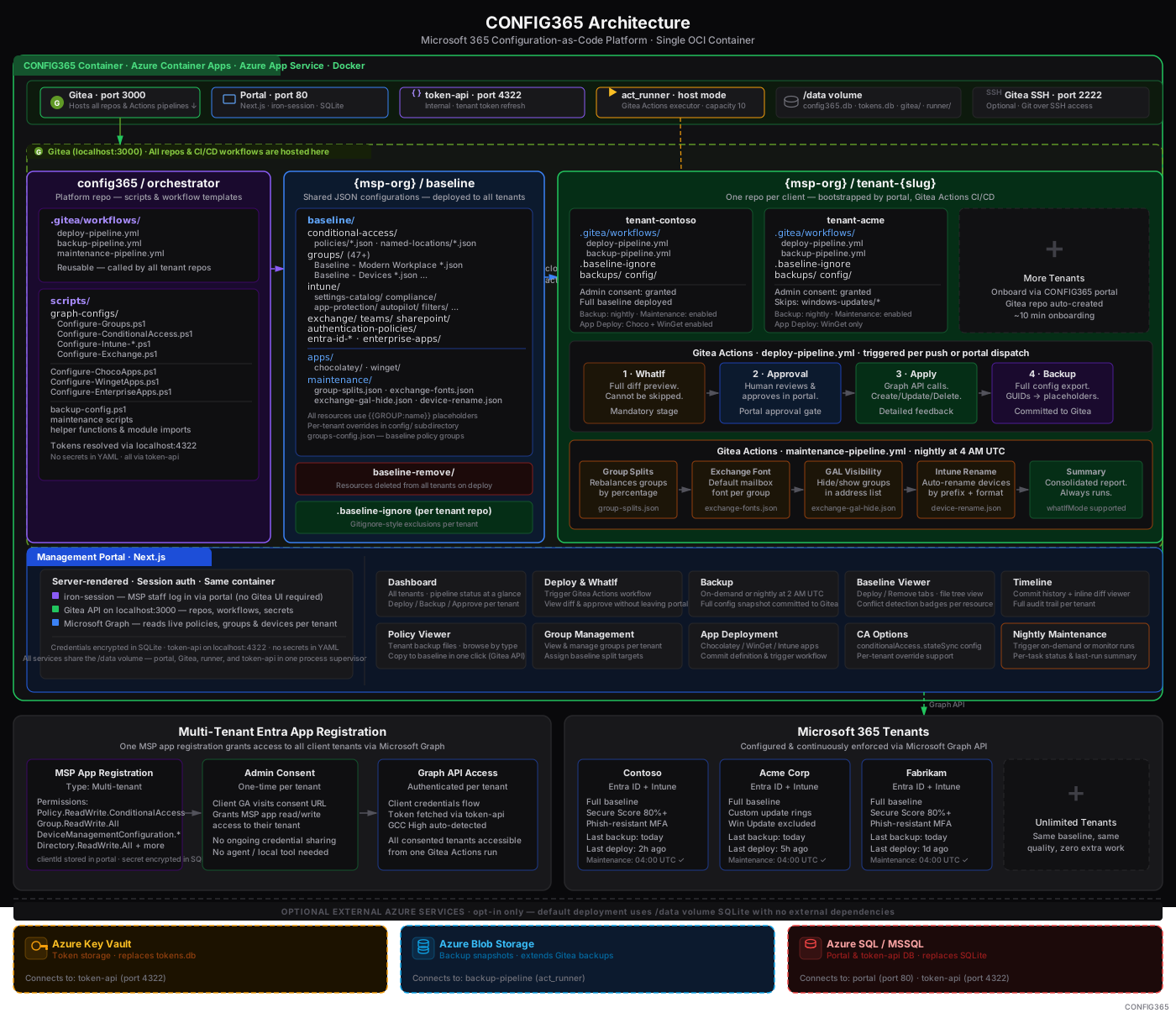
CONFIG365 ships as a single OCI container. The Next.js management portal, Gitea (Git server + Actions CI), act_runner, and the internal token-api all run together — deploy to Azure Container Apps, Azure App Service, or any Docker host. Credentials are encrypted at rest in SQLite and never leave your container.
Portal Views
Tenant Dashboard
Multi-tenant overview with pipeline status, last backup time, and one-click deploy or approve per client.
WhatIf Preview
Review every create, update, and delete before it applies. Approve or reject with full diff context.
Policy Viewer
Browse tenant backups with filename and content search, resizable file panel, and one-click promote to baseline — including large repos with 2000+ backup files.
Baseline Viewer
Compare a live tenant backup against the shared baseline. Surface deviations and conflicting tenant-only overrides.
Timeline
Full deployment history with per-commit diffs. Restore any resource to a previous state directly from the UI.
App Deployment
Deploy Win32 apps via Chocolatey or WinGet, push mobile apps through Intune, and manage enterprise app registrations.
Group Management
Define Entra ID groups as JSON with dynamic membership rules. Baseline-group targeting restricts policies to the right tenant set.
CA Options
Per-tenant Conditional Access sync overrides. Set global policy state, or let individual tenants preserve custom CA configurations.
Maintenance Tasks
Run scheduled or on-demand operations: group splits, Exchange font defaults, GAL visibility, and Intune device renaming.
OS Version Control
Set minimum OS thresholds for Android, iOS, Windows, and macOS. Latest versions fetched automatically; apply updates across all tenants in one operation.
License-Based Policy Assignment
Policy groups can automatically include tenants based on their Microsoft 365 license subscriptions — no manual list maintenance required. Define a license rule once in the baseline and every qualifying tenant receives the right policies on their next deploy, even as licenses change over time.
Daily Backup
The backup pipeline exports each tenant's subscribed SKUs to backups/licenses/subscribed-skus.json — alongside groups, policies, and Intune configs.
License Rules in Baseline
Each policy group in groups-config.json defines which SKU part numbers qualify. E.g. SPE_E3 or ENTERPRISEPREMIUM for an Enterprise CA group.
Automatic at Deploy
Resolve-TenantGroups.ps1 reads the backed-up SKU data and evaluates rules live. Qualifying tenants receive the group's extra content — no YAML edits, no manual assignment.
Rule defined in baseline
{
  "Enterprise": {
    "membership": {
      "dynamic": [{
        "type": "license",
        "skuPartNumbers": [
          "SPE_E3",
          "SPE_E5",
          "ENTERPRISEPREMIUM"
        ]
      }]
    },
    "content": {
      "folders": [
        "conditional-access/enterprise"
      ]
    }
  }
}
At deploy time
## Resolve-TenantGroups.ps1
Loaded 12 subscribed SKU(s)
Dynamic match: 'Enterprise'
└ license rule matched SKU
└ ENTERPRISEPREMIUM
Extra folder applied:
conditional-access/enterprise/
Zero maintenance: When a tenant upgrades from Business Premium to E3, their next scheduled deploy automatically picks up the Enterprise policies — no portal action needed.
Evaluated at
Deploy time
No pre-sync required
License data source
Tenant backup
backups/licenses/subscribed-skus.json
Extensible to
Any rule type
license · domain · country · …
System Architecture
GitOps Approach
CONFIG365 follows a GitOps model where configurations are stored as JSON files in Git repositories and deployed through CI/CD pipelines. This gives you:
Version Control
Every change tracked in Git history with author and timestamp.
Audit Trail
Who changed what, when, and why — always available.
Rollback Capability
Revert to any previous configuration state with a single commit.
Review Process
Pull requests for changes before they reach the pipeline.
Approval Gates
Human approval required before any configuration is applied.
Security Model
CONFIG365 runs as a single OCI container — on Azure Container Apps, Azure App Service, or any Docker host. The management portal, Gitea, act_runner, and token-api all run inside the same container. No third-party SaaS ever touches your tenant credentials or M365 configurations.
The Orchestrator
- Gitea Actions jobs executed by act_runner running in your own container (host mode)
- PowerShell scripts call Microsoft Graph directly using tokens fetched from the internal token-api
- Org-level Gitea secrets store credentials — scoped to your MSP org, never exposed to tenants
- Workflow YAML lives in your Gitea repositories — version-controlled and fully auditable
The Management Portal
- Next.js server-rendered app with iron-session authentication — runs inside the CONFIG365 container
- Tenant credentials encrypted at rest in SQLite on your own volume — never leave your infrastructure
- Internal token-api on localhost:4322 handles delegated auth flows without exposing secrets in workflow YAML
- MSP staff log in via the portal — no Gitea UI access or CLI skills required
Your infrastructure, your data.
CONFIG365 credentials — Entra ID app client secrets, tenant IDs, and delegated tokens — are stored exclusively in your container's encrypted SQLite database on your own persistent volume. The only parties that ever touch your credentials are your CONFIG365 instance and Microsoft Graph.
Multi-Tenant Architecture
For MSPs managing multiple tenants, CONFIG365 supports a shared baseline with per-tenant repositories. Each tenant repo inherits shared configurations while maintaining tenant-specific overrides and assignments.
baseline-repo
Shared configurations
Deployment Workflow
Every deployment follows a safe, predictable three-stage workflow:
WhatIf Preview
All scripts run with the -WhatIf flag. You see exactly what will happen before anything changes.
## Processing Intune Configurations
→ Would CREATE: 5 policies
→ Would UPDATE: 12 policies
○ No changes: 83 policies
Approval Gate
Pipeline pauses and waits for human approval. Approve directly from the CONFIG365 portal dashboard.
Apply Changes
After approval, configurations are applied via Microsoft Graph API. Each resource reports its status.
✓ Created: Windows Defender Antivirus
✓ Updated: BitLocker Encryption
✓ Assignments applied: 8 policies
○ No changes: 83 policies
##[command] All Intune policies configured successfully!
Automated Backup
Immediately after a successful deployment, the backup pipeline runs automatically — exporting the full current configuration state and committing it to the tenant's own Git repository as a timestamped snapshot. Because every backup is a Git commit, the repo builds up a complete, permanent history of the tenant's configuration over time. Any past state is instantly recoverable.
##[section] Post-Deployment Backup
Exporting Conditional Access policies...
Exporting Intune configurations...
Exporting Groups, Exchange, Teams...
✓ Backup committed to backups/ (42 files)
Scoped Deployments
By default a deploy run is fully scoped — all enabled categories are planned and applied. The deployOptions pipeline parameter lets you restrict a run to a specific combination of operations and policy categories, so you can, for example, delete-only without touching any create or update logic.
Operation flags
| Flag | Effect |
|---|---|
allowCreate | Configure-*.ps1 scripts may create new resources that are in the baseline but missing from the tenant. |
allowUpdate | Configure-*.ps1 scripts may update resources that already exist but differ from the baseline. |
allowDelete | Remove-*.ps1 scripts run and delete resources listed in baseline-remove/ or pending-removes/. |
Important: Configure (create/update) steps are gated on allowCreate or allowUpdate. Passing only allowDelete skips all Configure steps entirely — no unintended creates will run.
Category flags
Category flags select which policy types the pipeline processes. At least one must be present alongside the operation flags.
deployIntunedeployConditionalAccessdeployGroupsdeployCustomAttributesdeployEntraIdDeviceSettingsdeployTeamsdeploySharePointdeploySharePointSettingsdeployInformationProtectiondeployExchangedeployAppsChocolateydeployAppsWingetdeployAppsCustomdeployEnterpriseAppsdeployAuthenticationPoliciesdeployEntraIdConsentpermissions Behaviour matrix
| deployOptions value | Step runs? | Creates? | Updates? | Deletes? |
|---|---|---|---|---|
allowCreate,allowUpdate,allowDelete,deployIntune | ✓ | ✓ | ✓ | ✓ |
allowCreate,allowUpdate,deployIntune | ✓ | ✓ | ✓ | — |
allowCreate,deployIntune | ✓ | ✓ | — | — |
allowUpdate,deployIntune | ✓ | — | ✓ | — |
allowDelete,deployIntune | — | — | — | ✓ |
The Create/Update columns reflect what the script does — controlled by ALLOW_CREATE / ALLOW_UPDATE env vars passed into each Configure-*.ps1.
Example — delete-only run for Intune and Conditional Access
# Gitea Actions workflow dispatch (manual override)
deployOptions: allowDelete,deployIntune,deployConditionalAccess

# ↳ Configure-Intune.ps1            SKIPPED  (no allowCreate / allowUpdate)
# ↳ Configure-ConditionalAccess.ps1 SKIPPED  (no allowCreate / allowUpdate)
# ↳ Remove-Intune.ps1               RUNS     (allowDelete + deployIntune)
# ↳ Remove-ConditionalAccess.ps1    RUNS     (allowDelete + deployConditionalAccess)
Deployment Feedback
CONFIG365 provides detailed, actionable feedback for every policy:
##[section] Summary
Total policies: 120 (118 processed, 2 blocked)
✓ Created: 5
✓ Updated: 12
✓ Assignments applied: 8
○ No changes: 93
✗ BLOCKED: 2 (missing groups)
##[error] BLOCKED POLICIES - Cannot deploy due to missing dependencies:
✗ [settings-catalog] New Feature Policy
Missing: Baseline - Feature Pilot Users
By Policy Type:
✓ settings-catalog: 3 created, 5 updated, 42 unchanged
✓ compliance-policies: 1 created, 2 updated, 15 unchanged
✓ device-configurations: 1 created, 5 updated, 36 unchanged
═══════════════════════════════════════════════════
DETAILED CHANGES
═══════════════════════════════════════════════════
┌─ [settings-catalog] Windows Defender Settings
│ defenderCloudBlockLevel: 'high' → 'highPlus'
│ Description: 'Old desc' → 'Updated description'
└─────────────────────────────────────────────────
Handling Errors
CONFIG365 catches common issues before they become problems:
Missing Groups
If a policy references a group that doesn't exist, the deployment is blocked with a clear message:
API Errors
Graph API errors are captured with full details, not hidden behind generic messages:
Failed: Windows Update Ring
Code: BadRequest
Message: Property 'featureUpdatesDeferralInDays' must be between 0 and 365
Continue on Error
When one policy fails, CONFIG365 continues processing the rest. You get a complete summary at the end showing all successes and failures.
Backup Pipeline
A dedicated backup pipeline runs automatically each night at 2 AM UTC, exporting every client's live M365 configuration to their Git repository as plain JSON. The same resource types that can be deployed can also be backed up — making point-in-time restore as simple as copying files from a past commit back into the baseline and re-running the deploy pipeline.
Supported resource types — deploy & backup
The full picture
CONFIG365 turns Microsoft 365 configuration management into a repeatable, auditable engineering practice. A shared baseline in Git, approval-gated Gitea Actions pipelines, and a hosted management portal give your team complete control across every tenant — all running in a single container you fully own and control.
Every policy, group, and configuration as a JSON file. Full history, diffs, and rollback via Git.
One baseline deploys to unlimited tenants. Approval gates and WhatIf previews before any change lands.
The management portal, Gitea, act_runner, and token-api all ship in one container — deploy to Azure Container Apps, Azure App Service, or any Docker host.
Deploy apps, manage groups, inspect drift, and trigger pipelines from a purpose-built web UI.
Group rebalancing, Exchange fonts, GAL visibility, and device renaming — scheduled and on-demand.
Per-tenant exclusions, resource protection markers, and a two-confirmation remove workflow prevent accidental changes.